



Insta360 Invisible Mic Cold Shoe for X5 & RODE

R 460.07 Incl. VAT


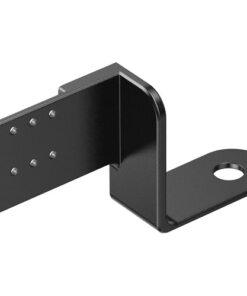
The Insta360 Invisible Mic Cold Shoe for X5 & RODE is a compact microphone mount designed to keep your RODE wireless microphone receiver secure and out of your Insta360 X5 camera’s view. As a result, you can capture cleaner-looking footage while enjoying the benefits of external audio recording.
This clever bracket fits between your camera and a selfie stick, mini tripod or compatible support. In addition, it requires no extra mounting screws or hardware for installation. Simply position it beneath the camera’s 1/4″-20 mounting hole and attach your support as usual.
Furthermore, the bracket allows you to clip your microphone receiver on and off with ease. It also includes a short audio cable and a hook-and-loop strap to help keep your setup neat while recording.
Key Features
- Compact Microphone Bracket: Holds a compatible RODE wireless microphone receiver beside the Insta360 X5.
- Invisible in Footage: Keeps the microphone receiver out of the camera’s field of view.
- Easy Installation: Fits between the camera and your selfie stick or other compatible support.
- Quick Microphone Attachment: Clip the receiver on or off the bracket when needed.
- Audio Cable Included: Connects the microphone receiver to the separately available Insta360 X5 Mic Adapter.
- Cable Management Strap: Keeps the audio cable secured to your selfie stick.
- Flexible Setup: Works with compatible selfie sticks, mini tripods and other supports.
Keep Your Microphone Out of View
The Insta360 Invisible Mic Cold Shoe helps you record professional-looking footage without showing your microphone receiver in the frame. Therefore, it is ideal for vlogging, interviews, travel videos and other content where a clean camera view matters.
Moreover, its compact design keeps your recording setup simple without adding a bulky bracket to your camera.
Designed for RODE Wireless Microphones
This bracket is designed to hold compatible RODE wireless microphone receivers, including the:
- RODE Wireless GO
- RODE Wireless GO II
- RODE Wireless ME
- RODE Wireless PRO
The receiver clips onto the bracket, so you can attach or remove it quickly. However, you will need the separately available Insta360 X5 Mic Adapter to connect the receiver to your camera.
Simple Installation and Cable Management
Installing the Insta360 Invisible Mic Cold Shoe is straightforward. First, place the bracket underneath the camera, aligned with the 1/4″-20 threaded mounting hole. Next, attach your selfie stick, mini tripod or compatible support.
Once installed, connect the included audio cable between the microphone receiver and the compatible Insta360 Mic Adapter. Finally, use the supplied hook-and-loop strap to secure the cable to your selfie stick. This helps reduce loose cables and keeps your setup tidy while recording.
Technical Specifications
| Specification | Details |
|---|---|
| Product Name | Insta360 Invisible Mic Cold Shoe for X5 & RODE |
| Brand | Insta360 |
| Compatible Camera | Insta360 X5 |
| Microphone Compatibility | RODE Wireless GO, GO II, ME and PRO |
| Mounting Position | Between the camera and selfie stick or support |
| Camera Mount Interface | 1/4″-20 threaded mounting point |
| Microphone Mount | Clip-on receiver bracket |
| Included Accessories | Audio cable and hook-and-loop strap |
| Mic Adapter | Insta360 X5 Mic Adapter, sold separately |
What’s in the Box?
- Insta360 Invisible Mic Cold Shoe bracket
- Short audio cable
- Hook-and-loop cable strap
Note: The microphone receiver and Insta360 X5 Mic Adapter are sold separately.
Why Choose the Insta360 Invisible Mic Cold Shoe?
The Insta360 Invisible Mic Cold Shoe for X5 & RODE is a practical accessory for creators who want better audio options without a visible microphone receiver in their footage. In addition, its simple mounting design makes it easy to add to an existing camera setup.
Whether you are filming travel videos, recording interviews or creating online content, this compact bracket helps keep your equipment organised and your footage looking clean.
| Weight | 0.05 kg |
|---|---|
| Dimensions | 11 × 5 × 5 cm |
Brand
Insta360
Insta360 is a camera brand best known for 360-degree cameras, action cameras and compact wearable cameras.
Its cameras are commonly used for:
- 360° filming: Capture the surroundings and choose the viewing angle when editing.
- Outdoor activities: Record fishing, camping, travel and 4×4 trips.
- Action footage: Film sport and movement with image stabilisation.
- Content creation: Make videos for social media, product demonstrations and business marketing.
Be the first to review “Insta360 Invisible Mic Cold Shoe for X5 & RODE”
You must be logged in to post a review.
Related products





Reviews
There are no reviews yet.